Pages

Showing posts with label Information. Show all posts

Wednesday, June 26, 2013

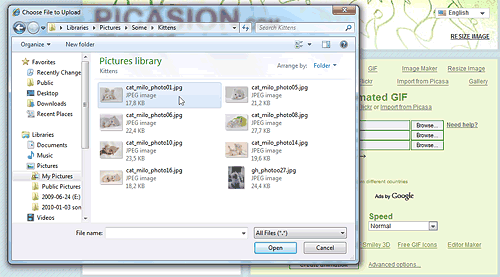
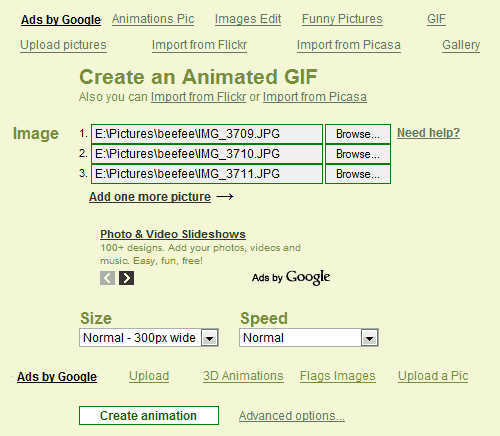
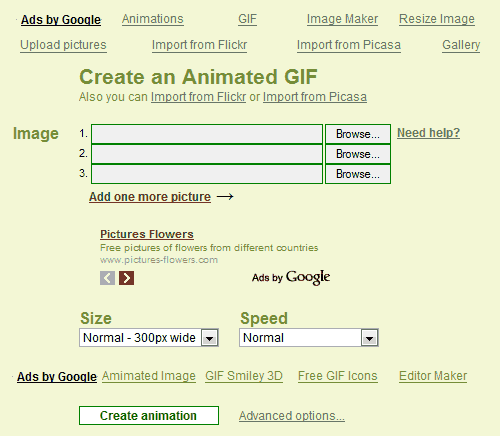
How to make a GIF using Picasion


Read more »»  

How to Use Your Android Phone as a Portable Wi-Fi Hotspot


Android Wireless & networks Settings

Just as you can use the iPhone as a Wi-Fi hotspot, many Android smartphones and tablets, starting with version 2.2 (Froyo) can be used as mobile hotspots or portable Wi-Fi hotspots, letting you share your data connection on your Android device wirelessly with up to 5 other devices, including other cell phones, tablets, and computers. The Wi-Fi data sharing feature is built into the Android devices.
This is more convenient than traditional tethering where you would share a data connection with a single computer using a USB cable or bluetooth, possibly with the help of software like PdaNet. Using the portable Wi-Fi hotspot feature, you don't need to have the app installed on your laptop or other devices and you get simultaneous Wi-Fi internet access for several devices. The downside, however, is that your carrier may charge a fee for the Wi-Fi hotspot feature (but most are charging extra for tethering too, so they're really the same thing).
Using your phone as a Wi-Fi hotspot is pretty simple; you just need to turn the feature on in your phone, and then the Wi-Fi signal will appear just like a regular wireless access point that your other devices can connect to. Here are the step-by-step instructions (they may vary a bit depending on your device, but the overall gist is the same).

Updated: Workaround for Enabling Wi-Fi Hotspot for Free on Carrier-Restricted Plans

The instructions below are for the universal Wi-Fi hotspot feature found in Android, but even if you follow them you might not get internet access on your laptop or tablet after you connect. The reason is that some wireless carriers restrict the Wi-Fi Hotspot access to only those who are paying extra every month for Wi-Fi Hotspot access ($15-30 more a month on top of their mobile data plans).
Computerworld has posted a workaround to this Wi-Fi hotspot blocking: Use an Android widget app such as Extended Controls or Elixer 2, which toggle the Wi-Fi hotspot on or off on your homescreen so you can access the hotspot feature directly (without going through extra charges from your wireless provider). If that widget doesn't work for you, a free app called FoxFi does the same thing. Note that with other kinds of tethering, this is definitely a "do at your own risk" procedure.
That said, if you aren't restricted from using the Wi-Fi hotspot feature on your Android device, this is how to enable it and share your mobile data plan:

Turn on the Portable Wi-Fi Hotspot on your Android smartphone (or tablet)

  1. Go to the Settings screen on your Android phone. You can get there by pressing the menu button on your device when you're on the home screen, then tapping "Settings".
  2. At the Settings screen, tap the "Wireless & networks" option.
  3. You should see an option for "Portable Wi-Fi hotspot". Click the check mark beside it to turn on the hotspot and your phone will start acting like a wireless access point. (You should see a message in the notification bar when it's activated.)
    • To adjust and check the settings for the hotspot, tap the aptly named "Portable Wi-Fi hotspot settings" option. You'll need to do this if you don't know the default password that will be created for your hotspot so you can make a note of it for connecting your other devices.
    • You can change the default password, security level, router name (SSID), and also manage users connected wirelessly to your phone in the Wi-Fi hotspot settings.

Find and Connect to the New Wi-Fi Hotspot Created

  1. From each of the other devices you want to share Internet access with, find the Wi-Fi hotspot; this will probably be done automatically for you. (Your computer, tablet, and/or other smartphones most likely will notify you that there are new wireless networks to connect to. If not, on another Android phone, you'll find the wireless networks under Settings > Wireless & networks > Wi-Fi settings. See general Wi-Fi connection instructions for most computers.
  2. Finally, establish the connection by entering in the password you noted above.

Tips and Considerations

  • Make sure you turn off the Wi-Fi hotspot feature when you no longer need shared Internet access from the other devices, since this can drain your cell phone's battery significantly.
  • By default, the portable Wi-Fi hotspot will most likely be set up with WPA2 security and a generic password. If you're using this feature in a public place or concerned about hackers trying to intercept your data, it's best to change the password to something else before broadcasting your signal.
  • Keep in mind again that your cell phone company might charge extra for this feature and/or have data restrictions on its usage, so make sure you check your plan or with your carrier for more information.

Read more »»  

How to make your Android phone look like an iPhone 5


If you're curious what your Android phone would look like disguised as an iPhone 5, there's a launcher program that will do just that.
Fake iPhone 5 (Credit: Screenshot by Ed Rhee/CNET)
Apps that make Android phones look like iPhones aren't new by any means, but they remain an interesting novelty that seems to appeal to a lot of Android users. If you've been curious about how iOS 6 would look on your Android phone, a new app called Fake iPhone 5 has just been uploaded to Google Play.
Created by a user at XDA Developers, Fake iPhone 5 is a replacement launcher that makes your Android phone's screen look almost exactly like an iPhone 5's. The main home screen's icons look like duplicates of iOS 6's. By default, the launcher starts with four rows of icons, but you can switch to five.
As great as the launcher looks, it does have some limitations that might prevent you from running it all the time. For example, you can't rearrange the icons on the screens and you lose widget support.
Also, while most of the iOS 6 app icons correlate to their Android counterparts, some, like Passbook, do not. Tapping on the Passbook icon will launch an ad, which is a reminder that Fake iPhone 5 is an ad-supported app.
Tip: To switch back to your previous launcher, tap the Menu key on your Android phone, then Advanced > Switch Launcher.
That's it. Will you use Fake iPhone 5 as your primary launcher? If not, let us know what alternative launchers you prefer for your Android phone.

Read more »»  

How to make my Computer faster

There are several things you can do to increase the "speed" of your computer.

1) Clean up the disk. Uninstall unneeded programs (especially those that run at startup and/or put something in the system tray), run Disk Cleanup, and defragment the drive. This is a good first step that will almost always take a few seconds off boot time and application loads for any computer.

2) Stomp auto-starting programs. Click Start > Run and type "msconfig" at the prompt. Click the Startup tab and look at all that junk that loads when you launch your PC. Do you really need "Adobe Reader Speed Launch"? Probably not. Turn off anything else that looks useless, but be careful not to disable your anti-virus and important system components.

3) Run a full anti-virus and anti-spyware scan. I would recommend using AVG Free anti-virus, Malwarebytes and SUPERAntiSpyware remover. These programs are all free.

4) Clean up the registry. CCleaner, available at http://www.ccleaner.com is free and worth running. It will also remove unused files from your system - allowing Windows to run faster and freeing up valuable hard disk space.

Those are the easy and free things you can do. If your computer is still slow you need to move on to the bigger guns.

1) Upgrade RAM. This is the one killer trick that will make almost any computer run faster. With an older PC, you will rarely have enough RAM to run today's memory-hogging operating systems and applications, and adding a high-capacity stick or two of quality RAM will give you a quick speed boost. Adding RAM is fairly simple, even for a novice, and you should be able to do the job in 5 or 10 minutes.You can run a free test at http://www.crucial.com and find out what kind of RAM (memory) your computer needs.

2) Reinstall Windows. If the above tricks haven't helped, it may be time to wipe the slate clean and start again, reformatting your hard drive, reinstalling your applications, and restoring your data files from a backup. You'd be surprised how much more responsive a freshly reinstalled Windows system can be, as you've wiped out years of temp files, garbled registry entries, old versions of software programs that have been upgraded repeatedly, and all sorts of other electronic junk. Reinstalling is easy if you have the "recovery disk" that came with your PC, and only a bit more involved if you're using a retail copy of Windows XP. Just be sure you back up everything you want to take with you before you pull the trigger!

3) Upgrade your hard drive. This is a more complicated solution, but if you're reinstalling Windows (per the prior tip) you might consider upgrading to a bigger and possibly faster hard drive, too. Hard disk storage is a performance bottleneck on every machine, and magnetic disks degrade over time. Some performance issues could be caused by a failing hard drive, even, and upgrading to a new model could really put some zip back in your system. As a bonus, you can use the original hard drive for backups or occasional storage, if you put it in an enclosure.
Read more »»  

How to Repair a Windows 7 System with an Installation Disc


You can never have too many Windows repair discs. A previous tip showed how to obtain a full Windows 7 installation disc for use in repair. Here is how to use the installation disc to run System Recovery Options to fix problems.
Be sure that the DVD you are using is for the same edition of Windows 7 that you are trying to repair – for example, Windows 7 Home Premium, 64-bit or whatever specific version that you have. A full installation disc can be used for repair even if you have an OEM system. No product key is required in this process.
  1. Put the disc in your optical drive and restart to boot from the DVD. You may have to change the boot settings in your BIOS if booting from a CD/DVD is not enabled.  (See how here.) Watch for the  “Press any key to boot from CD or DVD” message.
  2. On the "Install Windows" screen, make the appropriate selections for language, time, and keyboard, and then click “Next”.
  3. On the next screen, click “Repair Your Computer”. Do not click "Install now"
  4. In “System Recovery Options”. select which operating system you want to restore if any are listed. It will be blank in many systems with only one operating system.
  5. Click “Next”.
  6. The “System Recovery Options” screen shown below will open.
  7. Select “Startup Repair” or whichever option you wish to apply.
WIndows 7 System Recovery Options

Read more »»  

Tuesday, June 25, 2013

How to Dress Harajuku Style

Dress Harajuku Style
Harajuku style originated among teens on the streets near Harajuku Station in Shibuya, Japan. It may have been brought to many people's attention by American singer Gwen Stefani, but the evolution of the style certainly didn't begin with her and it certainly won't end with her. Like many "street fashions" it is difficult to characterize because it is constantly changing and because it has many manifestations. There is no cookie-cutter approach to the style, but if you want to dress in Harajuku style, here are some guidelines to get you started.

Edit Steps

The Origins of Harajuku Style

  1. 1
    Shopping in an eclectic Harajuku boutique
    Shopping in an eclectic Harajuku boutique
    Mix and (mis)match different fashions. What is now known as Harajuku (like Halloween in Japan every Sunday) style started as teens in the district began to integrate traditional Japanese attire, especially kimonos and geta sandals, into their wardrobe. Before, they wore primarily clothes that were influenced by the West, but by mixing the traditional with the modern, they created a new style. Other examples of mixing and matching including the punk look with the schoolgirl uniform or a goth look with designer clothes. In Harajuku, mixing different styles and mismatching colors and patterns is encouraged - you can do anything you want, as long as your outfit is a thoughtful expression of your individuality (see Tips).

What is Everyone Wearing in Harajuku?

  1. 1
    Become familiar with variations of fashion in the Harajuku district. It's impossible to pinpoint one "Harajuku style." Many styles have originated or developed on the streets of Harajuku, and many Harajuku girls (and boys) integrate one or more of these somewhat more defined styles into their outfits.

    • Gothic Lolita involves wearing gothic, feminine and elegant clothes, to the extent that you look like a living Victorian doll.
      Gothic Lolita involves wearing gothic, feminine and elegant clothes, to the extent that you look like a living Victorian doll.
      Gothic Lolita involves wearing gothic, feminine and elegant clothes, to the extent that you look like a living Victorian doll.
    • Sweet Lolita is heavily influenced by the Rococo era more so than any of the other subcultures of Lolita. It focuses much more too on the child like aspects and uses light colours and child like fantasy themes. Alice in Wonderland, fruits, sweets and classic fairytales such as Little Red Riding Hood are recurrant themes in Sweet Lolita.
    • Japanese punks, inspired by the punk movement that began in London in the 70s, magnify rebelliousness with over-the-top clothes, accessories, makeup, and piercings.
      Japanese punks, inspired by the punk movement that began in London in the 70s, magnify rebelliousness with over-the-top clothes, accessories, makeup, and piercings.
      Japanese punks, inspired by the punk movement that began in London in the 70s, magnify rebelliousness with over-the-top clothes, accessories, makeup, and piercings.
    • Cosplay entails dressing up like your favorite cartoon/anime or computer game character.
      Cosplay entails dressing up like your favorite cartoon/anime or computer game character.
      Cosplay entails dressing up like your favorite cartoon/anime or computer game character.
    • Decora style favors bright colors, flamboyance and accessories from head to toe.
      Decora style favors bright colors, flamboyance and accessories from head to toe.
      Decora style favors bright colors, flamboyance and accessories from head to toe. You decorate yourself with plastic toys and jewelry, and it's not uncommon to have so many that you can hear them click together when the person moves.
    • Kawaii (literally translating from Japanese to "cute") places an emphasis on childlike playfulness--anime characters, ruffles, pastel colors, toys, and so on.
      Kawaii (literally translating from Japanese to "cute") places an emphasis on childlike playfulness--anime characters, ruffles, pastel colors, toys, and so on.
      Kawaii (literally translating from Japanese to "cute") places an emphasis on childlike playfulness--anime characters, ruffles, pastel colors, toys, and so on.
    • Wamono refers to mixing traditional Japanese attire with Western fashion.

Specific Harajuku Tips

  1. 1
    Dress in layers. One of the hallmarks of Harajuku is layering. Sweaters, vests, or jackets over blouses over t-shirts, dresses worn with leggings, and so on. Layering clothes (or giving the appearance of layering by wearing ruffled dresses, for example) allows you to mix and match a wider variety of different styles, and adds more dimension to your outfit.
  2. 2
    Customize your clothes. Secondhand clothing and do-it-yourself styles are popular ingredients in a Harajuku outfit. Like that flowered skirt but think it would look cuter with a ribbon pinned on it or with a more uneven, angular hemline? Get out the scissors and glue and make your store-bought clothes uniquely yours. Or, go even further and make your own skirt. Cutting the fabric to create bold angles and lines can make even a plain black dress appear remarkable and fun.
  3. 3
    Accessorize.
    Accessorize.
    Accessorize. Add any wild accessories you have, such as belts, earrings, hair clips, jewelry, and handbags. Remember, accessories can be colorful and loud, and they don't have to match your clothes. Speaking of loud, in decora, a particular Harajuku style, accessories embellish an outfit from head to toe, and objects such as bells are sometimes used to add an aural dimension to the wardrobe.
  4. 4
    Go wild with your hair and makeup.
    Go wild with your hair and makeup.
    Go wild with your hair and makeup. The Harajuku style doesn't have to stop with your clothes. Pigtails and other "cute" hairstyles are particularly popular, as is dying your hair. Creative, even theatrical makeup can be a fun addition.
  5. 5
    Wear whatever looks good to you. It's been said that the Harajuku style is not really a protest against mainstream fashion and commercialism (as punk was), but rather a way of dressing in whatever looks good to you. If you think mismatched rainbow and polka-dot leggings look good with a plaid dress, go for it!

Say Cheese!

1
Smile and say http://en.
Smile and say chiizu! If you dress Harajuku style outside of Harajuku, you'll likely draw attention from people unfamiliar with your international fashion sense. If the attention isn't positive, just smile graciously and keep going about your business. But if people ask questions or want to take pictures, strike a pose! The people in Harajuku are proud of their style, so you should be, too.
Read more »»  

Wednesday, April 24, 2013

Visual Kei Hair Style


Now getting into styling, visual kei hair can sometimes be difficult. It is pretty specific, and is a big part of the style.  You can wear many different clothing styles, and as long as you have a visual kei hairstyle, you’ll look visual kei (at least in my opinion). I believe hair is very important, so here is a detailed description on visual hair:
To start off, visual hair can be either short or long:


And can also be in multiple colors:


But still, don’t ever be worried if you can’t dye your hair, or don’t want to. There is nothing wrong with a natural hair color:


As for the visual kei haircut, you are defiantly going to need ALOT of layers. Visual kei hair is also typically parted on one side, and usually will show your ear on the side with less hair. This can be accomplished by parting your hair at your ear, or getting short layers cut just above your ear. The bangs in visual kei are also very choppy and will usually either be a heavy side band, or will be cut so the bangs are on one side. Also, if you want to achieve a really choppy, messy look most hair dressers will take your request to cut your hair only with a razor comb (the things used for hair thinning). I would highly suggest finding a picture of a hairstyle you like (as little styled as possible) from as many angles as you can find. This way, your stylist will have a better idea. Here are some basic examples:


Styling your hair, of course depends on your haircut. Many styling tips and tutorials can be found on youtube, and all over the internet. Typically hair will be spiked, and straight, but it depends on your personal style and preferences. Here are some examples:


Along with styling, I know we all have our lazy days. And you can still be visual kei on those bad days:


Read more »»  

Type of Visual Kei Fashion


Assuming the reason you are on this blog, is because you are a visual kei fan. Because of this, I know you already know what visual kei is, an probably know the history too. When it comes to fashion though, many fans are confused, or questioning the fandom. As a basic lesson, let’s go over the sub-genres of the visual kei fashion world.

Kurofuku Kei – literally translates as”black clothing.  These outfits usually consist of black suits, and are commonly linked with the early Visual acts such as Buck-Tick


Angura Kei – the name stems from the English word “underground”. The style is derived from a cultural movement particularly that of independent theater in Japan from the 1960’s and the fervent political unrest from which the decade is known globally.  Angura theatre is notably experimental and concerned with the Japanese mythos; that is Japanese beliefs, attitudes and cultural values. The sub-genre is also linked to eroguro and many bands bridge both lines but it is consider darker and more formal. It features the use of Japanese uniform, kimino or other types of traditional garb. An example of an Angura Kei band: Kagrra


Kote Kei – this type of Visual Kei is considered the oldest, original and most established form. It’s the  “classic” look. Usually the hair style is dramatic as well as the clothing. It is also important to note that this sub-genre is found in two types “Black” and “White” in which a band can portray a darker side as with the first type or a lighter more melodic side as with the latter. Types of Kote Kei are La’Mule, early Dir en Grey, Lariene, and Madeth Gray’ll.


Oshare Kei – This subgenre is probably the most distinctive of all the sub-genres, as well as the most well known. The word “oshare” means stylish or fashionable. Musically speaking, the sound is more pop or punk and the lyrics and themes are more positive and bright. The Oshare look is more colorful and cute and somewhat similar to decora. The clothes too tend to be more like street fashion and punk than other types. Popular oshare bands are An CafĂ©, SuG, THE KIDDIE and Kra.


Victorian/Lolita Kei- This style is considered more over the top,  more elegant, and has a stronger goth rock influence.  Personally, I get a lot of influence from this style. As the name suggests, it is based off of a more formal attire, and way less of a street fashion look. Also, the gender bending seems to be more distinct. Examples of this type of Kei would be Versailles and Kaya.

Eroguro Kei – The name is the combination of the English words “Erotic” and “Grotesque” often utilizing such extreme themes in an unnatural and twisted manner. As stated in the description of Angura Kei, the two genres are often related and have overlapping bands. Bands considered Eroguro Kei would be Merry or Dir En Grey, especially during their Vulgar period.


Koteosa Kei – This subgenre is a spin on Oshare Kei, being its “black version.” Bands that fit into this subgenre would be LM.C and Lolita23Q.


Casual Kei- As the name implies, the Casual Kei look is a very basic “everyday look”. A band that could be placed under this caterogry would be Plastic Tree.

Read more »»  

About Visual Kei


Visual Kei refers to a movement among Japanese rock (jrock) musicians and is characterized by the use of elaborate costumes, eccentric, looks and hairstyles. The Visual Kei look usually involves striking make-up,
The "kei" in Visual Kei is japanese for style of type, meaning "visual style music" The music ranges from eighties goth rock, to heavy metal to punk and usually some combo of the three. Most bands are indie but a not many make it to major labels such as Malice Mizer, Raphael, & Dir En Grey.
Visual Kei has influenced Harajuku style fashion, especially those who gather on Jingu Bashi - a pedestrian bridge connecting the bustling Harajuku district with Meiji Shrine. 
On the bridge you could find Visual Kei cosplayers (those dressed as their favorite musicians) and those in the subculture known as Gothic Lolita based on Lolita fashion. Often fans of such bands also will dress up for concerts, meet ups, and other events where they will see other people who enjoy Visual Kei.
Read more »»